

Quick Summary
A car key fob usually stops working because of a weak battery, a damaged button, water exposure, impact damage or a programming problem. Start by replacing the battery, since a dead or weak battery is the most common cause of fob failure.
- A dead or weak battery is the most common cause of fob failure.
- Handle the new coin-cell battery by its edges to avoid reducing contact.
- Check the rubber pad under each button for tears or flattened spots.
- When every fob fails at once, check the car battery, fuses and receiver wiring.
- Confirm the backup start reader location in the owner’s manual before trying to start the car.
Table of Contents
- Why Does My Car Key Fob Stop Working?
- Start With the Battery: Replacement and Handling
- Car Key Fob Not Working Even With a New Battery
- Car Key Remote Not Working Sometimes: Range and Interference Tests
- Both Key Fobs Not Working: Checking the Vehicle Side
- How to Start Car if Key Is Not Detected
- Booking Help for a Fob That Won’t Cooperate
- Frequently Asked Questions
Why Does My Car Key Fob Stop Working?
Last Updated: November 24, 2026
A car key fob usually stops working because of a weak battery, a damaged button, water exposure, impact damage or a programming problem. A weak or dead battery is the most common cause of fob failure, so that is where a reader should start.
When a key fob fails, it helps to sort the likely causes into a short list before you spend money on anything. Here are the usual suspects:
- Dead or weak battery: The most common cause by far, especially if the range has been shrinking for weeks.
- Battery installed wrong: The coin cell may be flipped or not seated against its contacts.
- Worn or stuck buttons: Pressing a button may not register if the rubber pad or internal contact is worn.
Start with the simplest explanation and work toward the harder ones. Changing the battery is inexpensive and rules out the most likely cause.
Start With the Battery: Replacement and Handling
Most key fobs use a small coin-cell battery, often a CR2032 or CR2025 lithium battery.

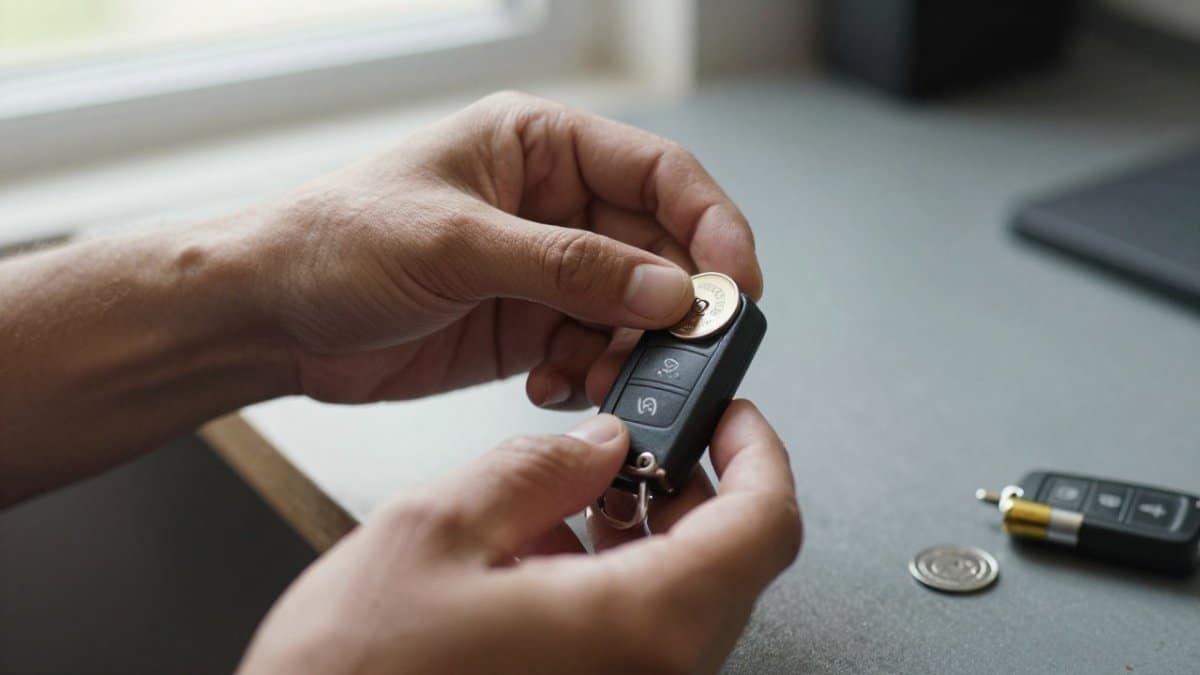
Follow these steps for a safe swap:
- Open the fob carefully. Pry gently along the seam so you do not crack the case.
- Check the battery label. Match the model number printed on the old battery.
- Handle the new battery by its edges. Skin oil can reduce contact over time.
- Seat it with the same polarity. The positive side usually faces up, so match the old battery.
- Close the case and test every button. Try lock, unlock and trunk release.
Keep button batteries away from children and pets. If swallowed, they can cause serious harm, so dispose of old ones safely (Button Cell and Coin Batteries).
Watch out: Forcing the case open can break the clips and let dust or moisture in.
The steps below sum up the battery swap, with the time or care each step calls for.
| Step | What to do | Time or frequency |
|---|---|---|
| Open the fob carefully | Pry gently along the seam | Slowly, without cracking the case |
| Check the battery label | Match the model number on the old battery | Before removing it |
| Handle the new battery | Hold it by its edges | Skin oil reduces contact over time |
| Seat it with the same polarity | Match the old battery’s orientation | Positive side usually faces up |
| Close the case and test | Try lock, unlock and trunk release | After every swap |
Car Key Fob Not Working Even With a New Battery
A new battery does not always fix the problem. If the fob still fails after a careful swap, the cause is usually a physical fault or a sync issue. Work through these checks before you assume the fob is dead.

Checking Buttons, Water Damage and Impact Damage
Look closely at the fob before you open it again. Many people miss damage that is easy to see once they know what to look for.
- Press each button firmly and watch for the indicator light.
- Check the rubber pad under each button for tears or flattened spots.
- Look for moisture, residue or green corrosion around the circuit board.
Water damage often shows up slowly, so a fob that worked yesterday may fail after a rainy week. Impact damage can break solder joints that look fine from the outside.
Reprogramming and Resynchronizing the Fob
Some cars need the fob to be resynced after a battery change or a power interruption. The steps vary by make and model, so check your owner’s manual first.
If resync steps fail, the fob may need reprogramming with a locksmith or dealer tool. Do not keep pressing buttons repeatedly, since some systems lock out after too many failed attempts.
Car Key Remote Not Working Sometimes: Range and Interference Tests
An intermittent fob is often a range or interference problem rather than a dead fob. Test it in a few different spots to see whether the car responds reliably.
Try this simple range test:
- Stand 3 feet from the car door and press lock.
- Step back to about 10 feet and try again.
- Test near a metal fence, a building wall and a parked truck to see if the signal drops.
Signal interference from phones, radio towers or other key fobs can cause short-range failures, especially in busy parking lots. If the fob works only in one spot, the environment is the likely cause.
Both Key Fobs Not Working: Checking the Vehicle Side
When every fob stops working at the same time, the problem usually sits in the car rather than in the keys. A single failed fob points to the battery, buttons or programming; two or more failed fobs at once point to something the fobs share: the vehicle’s receiver, its power supply, a fuse or the immobilizer system.
Step 1: Confirm the pattern
Before touching anything, confirm what “not working” means for each fob. Try every button on each fob from the same spot, then try starting the car with each fob using the backup start procedure in your owner’s manual. Write down which fobs fail on lock, unlock, trunk and start. If one fob still starts the car but neither locks the doors, the receiver or the door-lock circuit is more likely than the keys.
Step 2: Check the car battery and charging system
Keyless entry and push-button start draw on the vehicle’s 12-volt system, and a weak car battery is a common reason a fob suddenly stops being recognized. A resting battery that measures well below 12.4 volts, or one that drops sharply when you crank the engine, is suspect. A jump start or a battery that was disconnected can also reset the keyless module, which is why a fob sometimes stops working right after service.
Step 3: Check the fuses
Open the owner’s manual and find the fuse chart. Look for fuses labeled for keyless entry, smart key, immobilizer, body control module or door locks. Pull each one and check the element; a blown fuse is inexpensive to replace and rules out a whole circuit. If a fuse blows again immediately after replacement, stop and have the circuit tested, because a short will keep taking out the receiver.
Step 4: Check the receiver and its wiring
The receiver that picks up the fob signal is usually mounted behind a trim panel, near the rearview mirror, in the console or in the cargo area, and its location varies by make and model. Look for a loose connector, corrosion or a wire that was pinched during a recent repair or stereo install. A receiver that has lost power or ground will ignore every fob, no matter how fresh the batteries are.
Step 5: Rule out interference at the vehicle
If the fobs work everywhere except one parking spot, the vehicle is probably fine and the environment is the problem. Move the car a short distance and test again. If it works after the move, the original spot has a strong interference source and no repair is needed.
Step 6: Decide between a fob fault and a vehicle fault
The pattern tells you where to spend money. If one fob fails and the other works, the failed fob is the likely cause and a battery, button or reprogramming service is the next step.
Watch out: Do not replace both fobs before you have checked the car battery and fuses. If the vehicle side is at fault, new fobs will fail exactly like the old ones and you will have paid for programming twice.
How to Start Car if Key Is Not Detected
If the car says the key is not detected, you can usually still get in and start it. The exact procedure is set by the manufacturer and varies by make, model and even model year, so the owner’s manual is the authoritative source. The steps below explain what to look for and how the common systems behave, so you can find the right procedure quickly instead of guessing.
Get into the car first
Most fobs hide a mechanical key inside the shell. Look for a small release tab or slot on the back or side of the fob, slide or press it, and pull the key blade out. On some fobs the blade is released by prying off a cover; on others the whole fob slides apart. Use the blade in the driver’s door lock cylinder.
Find the backup start reader
The backup reader is the spot where the car expects the fob to be held when the fob battery is dead or the signal is not detected. Its location differs by vehicle and is the single detail most owners get wrong. Common locations include:
- Directly against the start button, holding the fob there while pressing the button.
- A marked pocket or slot in the center console, glovebox or cupholder area.
- A spot on the steering column shroud, sometimes marked with a key or radio-wave symbol.
Check the owner’s manual index under “smart key,” “keyless start,” “emergency start” or “starting the engine” for the exact location and the order of steps. If the manual is not in the car, the manufacturer’s owner site usually hosts a free PDF by model year.
Follow the start sequence
With the fob in the backup reader, press the brake pedal and the start button as you normally would. Some systems require you to hold the fob against the button for several seconds; others want the fob in the slot and the button pressed once. If the car still does not start, try the other common location for that model, because a fob placed a few inches from the reader may not register.
If the car still will not start
A fob that fails in the backup reader points to the fob battery, the fob itself or the vehicle-side reader. Replace the fob battery first, since that is the cheapest check, then try the backup reader again.
Watch out: The backup reader location is not universal, and holding the fob against the start button works on some models but not others.
Booking Help for a Fob That Won’t Cooperate
If you have tried a new battery, checked the buttons and tested the range, but the fob still fails, it is time to call a professional. A locksmith can help with the fob.
Call a professional when:
- The fob does not respond after a battery change and resync attempts.
- The car will not start and the key is not detected.
- The fob shows water or impact damage.
Natick Finest Locksmith offers experienced technicians available 24/7 for emergency and scheduled service in the Greater Boston area. For a fob that won’t cooperate, call Natick Finest Locksmith to discuss your options and get a clear quote.
Call Now to get fast help with your car key fob.
Frequently Asked Questions
Why did my key fob stop working all of a sudden?
A sudden failure usually has a simple trigger. The most common is a battery that drained over weeks and dropped below the level needed to send a clean signal, which can happen without any warning. Other sudden causes include a fob that was dropped hard enough to loosen internal connections, water that reached the circuit board, or a brief power interruption in the vehicle that cleared its memory of the fob. Start by replacing the battery, then test the fob at close range to the car. If it still fails, the problem is more likely internal damage or a sync issue that needs a locksmith to check.
How much does it cost to fix a car key fob?
Cost depends on the vehicle, the type of fob, and whether the problem is a battery swap or internal damage. A battery replacement is usually the cheapest fix and is often something you can do yourself. Repairs involving a damaged circuit board, worn buttons, or reprogramming cost more, and replacement fobs for many vehicles are priced higher than standard keys. Pricing depends on the specific vehicle and the work needed, so contact Natick Finest Locksmith or check the website for a current quote before booking.
Can I drive my car if my key fob dies?
Yes, in most vehicles you can still drive. A dead fob does not stop the engine by itself, but many modern cars with push-button start need the fob inside the vehicle to start it. Most vehicles include a physical emergency key inside the fob or elsewhere in the car that can open the driver’s door manually, and some have a designated spot where the fob should be placed to start the engine. Check your owner’s manual for the exact procedure for your make and model.

